 Dofight
L'assistant de combat pour Dofus 3
The fight assistant for Dofus 3
Un panneau à côté du jeu qui te montre le détail des monstres autour de toi.
A panel next to the game that shows you the details of the monsters around you.
Télécharger pour Windows ou MacDownload for Windows or MacGratuit · Open source · Windows 10 et 11 · macOS 14 et plus
Free · Open source · Windows 10 and 11 · macOS 14 and later
Dofight regarde seulement un coin de ton écran. Il ne clique jamais, n'envoie rien au jeu et ne lit ni sa mémoire, ni ses fichiers, ni son trafic réseau. Ce qu'il lit, en détail
Dofight only looks at one corner of your screen. It never clicks, never sends anything to the game, and doesn't read the game's memory, files or network traffic. What it reads, in detail
Ce que fait Dofight
What Dofight does
Pour chaque monstre autour de toi, tu vois son détail : ce qui est dangereux, ses résistances et ses sorts.
For each monster around you, you see its details: what is dangerous, its resistances and its spells.
Il suit ta sous-zone ou ton donjon
It follows your subarea or dungeon
Dès que tu entres dans une sous-zone ou un donjon, ses monstres s'affichent. Dofight lit le nom de la sous-zone en haut à gauche du jeu. En combat, le panneau s'ouvre tout seul et se referme à la fin.
Walk into a subarea or a dungeon and its monsters show up. Dofight reads the subarea name in the game's top-left corner. In a fight, the panel opens by itself and closes when the fight ends.
Mécaniques
Mechanics
Certains donjons et certaines zones ont une grosse mécanique, comme le cycle lunaire ou les vagues de monstres. Dofight l'explique dans une pastille « ⓘ ». Survole la pastille pour un aperçu, clique dessus pour l'épingler.
Some dungeons and zones have a big mechanic, such as the lunar cycle or monster waves. Dofight explains it in an “ⓘ” chip. Hover over the chip for a preview, click it to pin it.
La fiche d'un monstre
A monster's card
Les monstres sont repliés, avec des icônes qui signalent les dangers. Survole-en un pour un aperçu, clique pour ouvrir sa fiche : ses badges, ses résistances par élément et ses sorts. Survole un sort pour voir ce qu'il fait.
Monsters are collapsed, with icons that flag the dangers. Hover over one for a preview, click to open its card: its badges, its resistances by element and its spells. Hover over a spell to see what it does.
Mode Songes
Dreams mode
Dans les Songes, le mode s'active tout seul. Hors combat, survole un groupe de monstres sur la carte, ou affiche-les tous avec la touche du jeu : ils s'affichent dans la liste, avant le combat.
Dreams mode turns on by itself inside the Dreams. Out of a fight, hover over a monster group on the map, or show them all with the game's own key: they show up in the list, before the fight.
Ctrl + Maj + D affiche ou masque Dofight, même depuis le jeu (raccourci modifiable dans Paramètres → « Fenêtre »). Tu règles aussi le thème (assorti à ceux de Dofus), la taille du texte et l'opacité. L'interface existe en français et en anglais.
Ctrl + Shift + D shows or hides Dofight, even from inside the game (change it in Settings → “Window”). You can also set the theme (they match Dofus's), the text size and the opacity. The interface comes in French and English.
Ce que Dofight lit
What Dofight reads
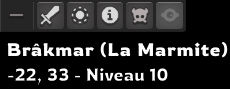
Ce n'est ni un bot ni un mod. Environ trois fois par seconde, Dofight capture la fenêtre Dofus quand elle est au premier plan, et n'en lit que le coin en haut à gauche (et, en mode Songes, les infobulles de groupes de monstres, où qu'elles soient dans la fenêtre).
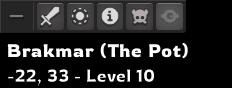
It isn't a bot or a mod. About three times a second, Dofight captures the Dofus window while it's in the foreground, and only reads its top-left corner (and, in Dreams mode, monster group tooltips, wherever they are in the window).
Comment il lit
- Si Dofus est en arrière-plan, il ne capture rien.
- En combat, il surveille surtout la barre d'icônes, pour voir quand le combat se termine ; s'il ne connaît pas encore ta sous-zone (Dofight ouvert en plein combat), il relit le nom de la sous-zone plus souvent, jusqu'à la trouver.
- En mode Songes, hors combat, quand ta souris s'arrête, il cherche les infobulles de groupes de monstres dans toute la fenêtre du jeu : elles s'affichent où se trouve le groupe, et le jeu peut toutes les montrer d'un coup. Il n'en retient que leur texte, et rien d'autre de l'écran n'est gardé ni envoyé : ni le tchat, ni les noms de joueurs, de guilde ou d'alliance, ni ton inventaire.
- Les captures ne quittent jamais ton ordinateur : c'est Windows, ou macOS sur Mac, qui y reconnaît le texte.
How it reads
- While Dofus is in the background, it captures nothing.
- In a fight it mostly watches the icon bar, to see when the fight ends; if it doesn't know your subarea yet (Dofight opened mid-fight), it re-reads the subarea name more often until it finds it.
- In Dreams mode, out of a fight, when your mouse stops, it looks for monster group tooltips anywhere in the game window: they appear where the group is, and the game can show them all at once. It keeps only their text, and nothing else on screen is kept or sent: not the chat, not player, guild or alliance names, not your inventory.
- The captures never leave your computer, where Windows, or macOS on a Mac, reads the text.
Ce qu'il ne fait jamais
- Cliquer ou jouer à ta place.
- Envoyer quoi que ce soit au jeu, ou le modifier.
- Lire la mémoire du jeu, ses fichiers ou son trafic réseau.
What it never does
- Click or play for you.
- Send anything to the game, or change it.
- Read the game's memory, its files or its network traffic.
Installation
Install
Dofight à installer, puis deux réglages à faire dans Dofus.
Install Dofight, then change two settings in Dofus.
Avant de commencer : Dofus 3 (en français ou en anglais), sur Windows 10 ou 11, ou sur un Mac avec macOS 14 ou plus récent.
Sur Windows, le français doit faire partie des langues de Windows (Paramètres Windows → Heure et langue → Langue et région) : Dofight s'en sert pour lire le texte à l'écran. Si ton Windows est en français, tu n'as rien à faire. Sur Mac, il n'y a rien à ajouter.
What you need: Dofus 3 (French or English client), on Windows 10 or 11, or on a Mac with macOS 14 or later.
On Windows, French must be in the language list (Windows Settings → Time & language → Language & region → Add a language → Français). Dofight uses it to read the text on screen, even with the game in English. You don't have to switch Windows to French. On a Mac, there is nothing to add.
Télécharge Dofight
Sur la page de la dernière version, prends le fichier
Dofight_…_x64-setup.exesur Windows, ouDofight_…_universal.dmgsur Mac (Intel et Apple Silicon). Les autres fichiers servent aux mises à jour.Installe-le
Sur Windows, si Windows affiche « Windows a protégé votre ordinateur », clique sur « Informations complémentaires », puis sur « Exécuter quand même » : Dofight est un petit projet, qui n'a pas de certificat payant.
Sur Mac, ouvre le
.dmget glisse Dofight dans Applications. Lance Dofight une première fois : macOS refuse de l'ouvrir, pour la même raison. Ferme le message, puis ouvre Réglages Système → Confidentialité et sécurité, descends jusqu'à « Sécurité » et clique sur « Ouvrir quand même ». Autorise ensuite Dofight dans Réglages Système → Confidentialité et sécurité → Enregistrement de l'écran (« Enregistrement de l'écran et de l'audio système » sur macOS 15 et plus récent), puis quitte et rouvre-le.Dans Dofus : affiche les coordonnées
Active Options → Interface → Cartes → « Afficher les coordonnées de la carte ». Dofight cherche le nom de ta sous-zone juste au-dessus des coordonnées : sans elles, il ne sait pas où tu es.
Dans Dofus : garde la barre d'icônes dépliée
Celle en haut à gauche du jeu. Dofight la surveille pour savoir quand un combat commence : il s'ouvre alors tout seul et se referme à la fin.
Download Dofight
On the latest release page, download
Dofight_…_x64-setup.exeon Windows, orDofight_…_universal.dmgon a Mac (Intel and Apple Silicon). The other files are for updates.Install it
On Windows, if Windows shows “Windows protected your PC”, click “More info”, then “Run anyway”: Dofight is a small project without a paid certificate.
On a Mac, open the
.dmgand drag Dofight to Applications. Open Dofight once: macOS refuses, for the same reason. Close the message, then open System Settings → Privacy & Security, scroll down to “Security” and click “Open Anyway”. Then allow Dofight in System Settings → Privacy & Security → Screen Recording (“Screen & System Audio Recording” on macOS 15 and later), and quit and reopen it.In Dofus: show the coordinates
Turn on “Show map coordinates” in the game options. Dofight looks for your subarea name just above the coordinates: without them, it can't tell where you are.
In Dofus: keep the icon bar expanded
The one in the game's top-left corner. Dofight watches it to know when a fight starts: it then opens on its own and closes when the fight ends.
Lance Dofus. La première fois, le guide « Bien démarrer » te montre où regarder et vérifie les deux réglages dans ton jeu. Tu le retrouves ensuite dans le menu ☰. Les mises à jour se font toutes seules.
Start Dofus. The first time, the “Getting started” guide shows you where to look and checks both settings in your game. It stays in the ☰ menu afterwards. Updates install themselves. The interface starts in French: switch to English in Paramètres → Langue.
Questions fréquentes
Frequently asked questions
C'est autorisé ?
Dofight n'est ni un bot ni un mod : il ne clique pas, n'envoie rien au jeu et ne modifie rien. Il lit uniquement le coin en haut à gauche de la fenêtre Dofus (et, en mode Songes, les infobulles de groupes de monstres, où qu'elles soient dans la fenêtre) et affiche des informations publiques (données du jeu, guides).
C'est un outil fait par des fans, sans lien avec Ankama, qui ne l'a ni validé ni approuvé : tu l'utilises sous ta propre responsabilité.
Que lit Dofight, et quand ?
Le coin en haut à gauche de la fenêtre Dofus (la barre d'icônes, le nom de la sous-zone et les coordonnées de la carte), et seulement quand Dofus est au premier plan. En combat, il surveille surtout la barre d'icônes ; s'il ne connaît pas encore ta sous-zone (Dofight ouvert en plein combat), il relit le nom de la sous-zone plus souvent, jusqu'à la trouver. En mode Songes, hors combat, quand ta souris s'arrête, il cherche les infobulles de groupes de monstres dans toute la fenêtre du jeu : elles s'affichent où se trouve le groupe, et le jeu peut toutes les montrer d'un coup. Il n'en retient que leur texte, et rien d'autre de l'écran n'est gardé ni envoyé : ni le tchat, ni les noms de joueurs, de guilde ou d'alliance, ni ton inventaire.
Tu peux tout couper dans Paramètres → « Lecture de l'écran » : Dofight ne capture alors la fenêtre Dofus que lorsque tu cliques sur « Scanner ma sous-zone ». Le détail est plus haut.
Qu'est-ce que Dofight envoie sur Internet ?
Rien pendant que tu joues : pas de compte, pas de statistiques. Il contacte GitHub pour ses mises à jour.
Si tu envoies une suggestion, il transmet ton message et, si tu laisses les deux options activées, l'état de Dofight (sous-zone lue, combat, version, paramètres) et son journal des 10 dernières minutes. Jamais de capture d'écran ni de chat, ni de nom de personnage, de guilde ou de compte.
Windows affiche « Windows a protégé votre ordinateur »
C'est normal : Dofight est un petit projet, qui n'a pas de certificat payant. Clique sur « Informations complémentaires », puis sur « Exécuter quand même ». Le code est public : tu peux le lire sur GitHub.
Sur Mac, Dofight ne s'ouvre pas ou ne lit rien
Au premier lancement, macOS refuse de l'ouvrir : Dofight est un petit projet, qui n'a pas de certificat payant. Ferme le message, puis ouvre Réglages Système → Confidentialité et sécurité, descends jusqu'à « Sécurité » et clique sur « Ouvrir quand même ».
Pour lire l'écran, Dofight doit être autorisé dans Réglages Système → Confidentialité et sécurité → Enregistrement de l'écran (« Enregistrement de l'écran et de l'audio système » sur macOS 15 et plus récent). Active-le, puis quitte et rouvre Dofight.
Dofight n'affiche rien, ou pas les bons monstres
Vérifie, dans l'ordre :
- Dans Dofus, l'option « Afficher les coordonnées de la carte » est activée (Options → Interface → Cartes).
- La barre d'icônes en haut à gauche du jeu est dépliée.
- Le français fait partie des langues de Windows (Paramètres Windows → Heure et langue → Langue et région). Sur Mac : Dofight est autorisé dans Enregistrement de l'écran.
- L'interrupteur « Lecture de l'écran » est allumé dans les paramètres de Dofight.
Le guide « Bien démarrer » (menu ☰) te dit si les deux réglages du jeu sont détectés.
Je joue sur plusieurs comptes
Choisis la fenêtre Dofus à lire dans Paramètres → « Lecture de l'écran ».
Le raccourci Ctrl+Maj+D ne fait rien
Il est sans doute déjà utilisé par une autre application. Choisis-en un autre dans Paramètres → « Fenêtre » : Ctrl, Alt ou Maj (avec Ctrl ou Alt) + une touche, ou une touche de fonction (F1 à F12). Sur Mac, le raccourci est Control+Maj+D, et Option remplace Alt.
Comment marche le mode Songes ?
Dans les Songes, le mode s'active tout seul. Le bouton « Songes » sert à l'activer ou à le couper à la main. Hors combat, survole un groupe de monstres sur la carte, ou affiche-les tous avec la touche du jeu : ils s'affichent dans la liste, avant le combat.
Comment mettre Dofight à jour ?
J'ai trouvé une erreur, ou j'ai une idée
Le bouton « Envoyer une suggestion », en bas de la liste, envoie ton message à l'équipe, de façon anonyme. Si tu veux une réponse, passe par le Discord.
Comment désinstaller Dofight ?
Paramètres Windows → Applications → Applications installées → Dofight → Désinstaller. Sur Mac, glisse Dofight d'Applications à la Corbeille.
Is it allowed?
Dofight isn't a bot or a mod: it doesn't click, sends nothing to the game and changes nothing. It only reads the top-left corner of the Dofus window (and, in Dreams mode, monster group tooltips, wherever they are in the window) and shows public information (game data, guides).
It's a fan-made tool, not affiliated with, reviewed or approved by Ankama: you use it at your own risk.
What does Dofight read, and when?
The top-left corner of the Dofus window (the icon bar, the subarea name and the map coordinates), and only while Dofus is in the foreground. In a fight it mostly watches the icon bar; if it doesn't know your subarea yet (Dofight opened mid-fight), it re-reads the subarea name more often until it finds it. In Dreams mode, out of a fight, when your mouse stops, it looks for monster group tooltips anywhere in the game window: they appear where the group is, and the game can show them all at once. It keeps only their text, and nothing else on screen is kept or sent: not the chat, not player, guild or alliance names, not your inventory.
You can turn it all off in Settings → “Screen reading”: Dofight then captures the Dofus window only when you click “Scan my subarea”. The details are above.
What does Dofight send over the Internet?
Nothing while you play: no account, no statistics. It contacts GitHub for its updates.
If you send a suggestion, it sends your message and, if you leave both switches on, Dofight's state (subarea read, fight, version, settings) and its log of the last 10 minutes. Never a screenshot, the chat, or a character, guild or account name.
Windows shows “Windows protected your PC”
That's normal: Dofight is a small project without a paid certificate. Click “More info”, then “Run anyway”. The code is public: you can read it on GitHub.
On a Mac, Dofight won't open or reads nothing
On first launch macOS refuses to open it: Dofight is a small project without a paid certificate. Close the message, then open System Settings → Privacy & Security, scroll down to “Security” and click “Open Anyway”.
To read the screen, Dofight must be allowed in System Settings → Privacy & Security → Screen Recording (“Screen & System Audio Recording” on macOS 15 and later). Turn it on, then quit and reopen Dofight.
Dofight shows nothing, or the wrong monsters
Check, in this order:
- In Dofus, “Show map coordinates” is on in the game options.
- The icon bar in the game's top-left corner is expanded.
- French is among your Windows languages (Windows Settings → Time & language → Language & region), even with the game in English. On a Mac: Dofight is allowed in Screen Recording.
- The “Screen reading” switch is on in Dofight's settings.
The “Getting started” guide (☰ menu) tells you whether both game settings are detected.
I play several accounts
Pick the Dofus window to read in Settings → “Screen reading”.
The Ctrl+Shift+D shortcut does nothing
Another app is probably using it. Pick another one in Settings → “Window”: Ctrl, Alt or Shift (with Ctrl or Alt) + a key, or a function key (F1 to F12). On a Mac, the shortcut is Control+Shift+D, and Option stands in for Alt.
How does Dreams mode work?
Dreams mode turns on by itself inside the Dreams. The “Dreams” button switches it on or off by hand. Out of a fight, hover over a monster group on the map, or show them all with the game's own key: they show up in the list, before the fight.
Is everything in English?
The interface, the badges, the game data and the summaries are available in English: switch in Paramètres → Langue (the app starts in French). The guides the summaries link to are in French.
How do I update Dofight?
I found a mistake, or I have an idea
The “Send a suggestion” button, at the bottom of the list, sends your message anonymously to the team. For a reply, ask on the Discord.
How do I uninstall Dofight?
Windows Settings → Apps → Installed apps → Dofight → Uninstall. On a Mac, drag Dofight from Applications to the Trash.